Have you ever had an app idea and thought, "This would be amazing, but I have no clue how to code"? That feeling is way more common than you might think. The good news is that building a basic app today no longer requires you to write a single line of code. There are free, visual tools — many with English interfaces and thriving communities — that let you put together fully functional apps by dragging blocks, clicking buttons, and setting up screens much like you would when designing a presentation in Canva. This article is the starting point you've been waiting for.
So what exactly is a "no-code app"?
The term is no-code, and it means exactly what it sounds like — no coding required. These are platforms that replace traditional programming with visual interfaces: you see the pieces, drag them where they belong, and the system handles all the behind-the-scenes logic on its own. Think of it this way: building an app the old-fashioned way was like assembling furniture by forging every single screw yourself. With no-code, you get the IKEA kit. Everything's already there — you just snap it together.
Don't confuse this with "building a website." We're talking about real applications — ones that run on your phone or in a browser, with user logins, databases, notifications, and everything else you'd expect. Small businesses, freelancers, and nonprofits are already using these tools to build solutions that would have cost thousands of dollars in custom development just a few years ago.
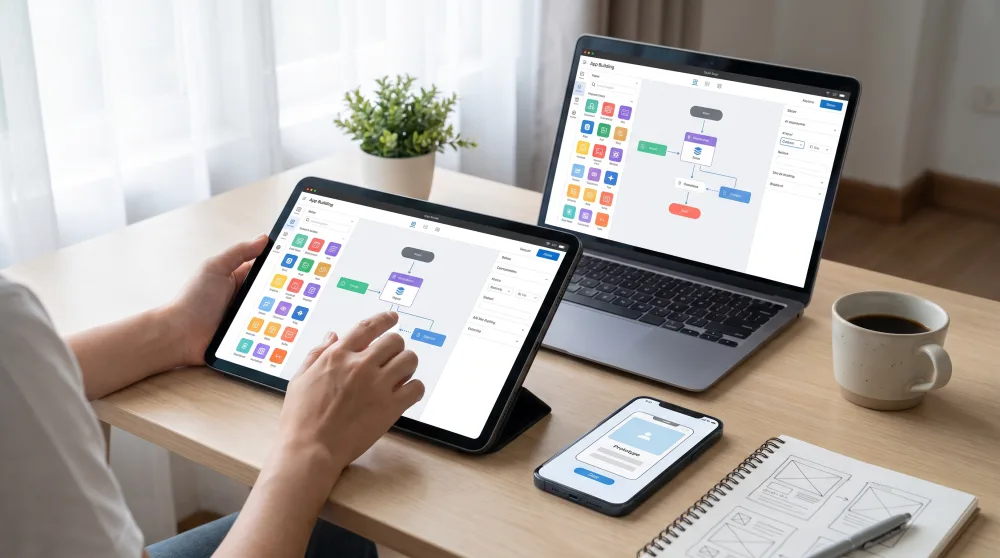
Before you start clicking around: define what your app will actually do
The most common mistake first-timers make is jumping straight into a tool before they've really thought through their idea. The result? Hours of poking around the platform with nothing to show for it. So before you open any website, grab a piece of paper or your phone's notes app and answer these three questions:
- What problem does the app solve? For example: "I want a task list for my work team" or "I want a product catalog I can share with customers on WhatsApp."
- Who will use it? Just you, your family, your customers? Your audience determines how complex the app needs to be.
- What screens does it need? A home screen, a sign-up screen, a list screen, a detail screen. Sketch it out on paper — boxes and arrows are totally fine.
Having this figured out ahead of time saves you hours. And trust me: most simple apps have between three and five screens. It doesn't need to be the next Instagram to solve a real problem.
The best free tools to get started right now
There are dozens of platforms out there, but for someone starting from scratch, a few stand out for their ease of use, generous free plans, and active communities with plenty of tutorials available. Here are the top ones:
Glide: the easiest of them all
Glide (glideapps.com) is probably the most beginner-friendly entry point out there. You connect a Google Sheets spreadsheet (Google's free version of Excel) and Glide transforms that data into a full visual app — with menus, photos, buttons, and more. Update something in the spreadsheet and the app updates instantly. It almost feels like magic.
Here's a practical example: say you have a list of rental properties. You put the data into a spreadsheet (address, price, photo, contact info) and in under an hour you have a working app where clients can browse listings, filter by price, and tap to get in touch. The free plan lets you build apps for personal use or small teams at no cost.
Bubble: for when you want to go further
Bubble (bubble.io) is more powerful. It lets you build web applications — ones that run in a browser — with more sophisticated logic: sign-up flows, payments, dashboards, all without writing a single line of code. The learning curve is steeper than Glide's, but the free plan still lets you publish a real, working app. If your idea involves users signing up, interacting with each other, or placing orders, Bubble can handle it.
The interface feels a bit like building a website in Wix, but with superpowers. You set up rules like "when the user clicks Buy, send a confirmation email and save the order to the database" — all by clicking, no typing required.
AppGyver (now SAP Build Apps): for mobile apps
If your goal is an app that runs natively on Android or iPhone, SAP Build Apps (formerly AppGyver) is a free and powerful option. It has a drag-and-drop interface for building screens and a visual system for setting up how things work. Publishing to the app stores (Google Play and the App Store) takes a few extra steps, but the development itself is entirely visual.
Softr: great for turning a spreadsheet into a portal
Softr (softr.io) works similarly to Glide, but it's focused on portals and member-area websites. It connects with Google Sheets or Airtable (a visual, free, and easy-to-use database) and generates clean interfaces with filters, search, and access control. It's a great choice for building a client portal, a members area for an online course, or a business directory.
Step-by-step: building your first app with Glide
Let me walk you through how this works in practice using Glide, since it's the most accessible option for beginners. The example here is a menu app for a restaurant or café, but the same logic applies to just about any simple idea.
- Create a free account at glideapps.com. You can sign in with your Google account.
- Create a Google Sheets spreadsheet with columns that make sense for your app. For a menu: Dish Name, Description, Price, Category, Photo (paste in an image URL).
- Fill in at least five rows with real data. The app is much easier to visualize with actual content than with "Item 1, Item 2."
- In Glide, click "New App" and choose "Google Sheets." Authorize access and select the spreadsheet you just created.
- Glide will automatically generate an app based on your columns. You'll see a list of dishes on the screen. From there, it's just tweaking: change colors, rearrange fields, choose which columns are visible.
- Use the left panel to add new screens, contact buttons (like "Message on WhatsApp"), or category filters.
- Click "Publish" and you'll get a link you can share with anyone. It works right in a phone's browser — no app installation needed.
Start to finish, this process takes between 30 minutes and two hours the first time around. After that, much less. The most time-consuming part is usually filling in the spreadsheet with content, not configuring the app itself.
What you won't be able to do (and that's okay to admit)
Being honest here matters. No-code tools have real limitations. If your idea involves very specific functionality — like integrating with a legacy banking system, building your own AI, or processing massive amounts of data — you'll eventually hit a ceiling. On top of that, the free plans on almost every platform cap the number of users, data storage, or available features.
But none of that is a reason not to start. Most app ideas people have are simpler than they imagine, and no-code handles them just fine. Major products like Notion and Typeform, along with internal tools at well-known companies, were prototyped with these kinds of platforms before a single developer was hired. You use no-code to validate your idea, see if people actually use it, and only then decide whether it's worth investing in custom development.
Common questions from people just getting started
Do I need to pay anything to get started?
Nope. Glide, Bubble, Softr, and SAP Build Apps all have free plans that let you build and publish working apps. You only pay when you want to lift restrictions — like supporting more users or using a custom domain.
Will my app show up in the Play Store or App Store?
It depends on the tool. With Glide and Softr, the app works like a mobile website (called a PWA) — no app store required. With SAP Build Apps, you can publish to the stores, but there are a few extra steps involved. For most early-stage use cases, a PWA works perfectly well.
What if I want other people to sign up and use the app?
All the tools mentioned here support user login systems. In Glide, you turn on the "Sign In" option and specify which email addresses have access. In Bubble, you build the full sign-up flow visually.
Does the app require an internet connection?
Generally, yes. Apps built on these platforms need a connection to work because the data is stored in the cloud — on remote servers, not on the user's device. Offline functionality is possible, but it gets significantly more complicated.
The next step is simply to start
The idea you've been sitting on could become something real this weekend. You don't need a programming course, you don't need to hire anyone, and you don't need money to get going. All you need is a spreadsheet, a free Glide account, and an afternoon with a spirit of exploration.
Write down your idea, sketch out the screens on paper, head to glideapps.com, and dive in. If you get stuck, search YouTube for "Glide tutorial" and you'll find detailed walkthroughs in minutes. The no-code community has grown enormously in recent years, and there are plenty of people ready to help. Your idea deserves to get off the ground.